Automated Client Reminders for Tax and Compliance Deadlines
How automated, staged client reminders help Australian accounting firms keep clients on track for BAS, IAS, tax return and other lodgement deadlines without manual chasing.
This guide is written for Accounting firms wanting to reduce late client responses and manual reminder chasing. It explains how the obligation fits into Australian public practice, how firms can plan lodgement deadlines before they become urgent, and how client reminders, workflow ownership and practice management routines can reduce compliance risk.
Key dates and timing considerations
Due dates are only useful when the firm turns them into a working system. Australian accounting firms need to know the statutory or ATO lodgement deadline, but they also need earlier internal workflow dates for record collection, preparation, manager review, partner review, client approval and final lodgement.
- A single reminder sent close to the due date is the least effective time to ask a client for records or approval.
- Staged reminder sequences, for example around 30, 14, 7 and 2 days before the due date, give clients enough notice without feeling like a last-minute chase.
- Reminder delivery and client response status should be visible against the obligation, not tracked separately.
How to operationalise this inside an accounting firm
The most effective firms treat this topic as part of a wider compliance operating rhythm, not as an isolated date in a diary. A partner, director or manager should be able to open one view and see which clients are affected, which due dates are coming up, which reminders have been sent, which work is waiting on the client and which lodgements are at risk. That visibility is what turns a tax calendar into a practice management tool.
For public practice teams, the first step is to define ownership. Every client should have a responsible manager or staff member, and every recurring obligation should have a clear workflow path. That path normally includes information requested, information received, preparation started, manager review, partner review, client approval and lodged. Smaller firms may use fewer stages, but the principle is the same: the firm needs a shared language for progress.
Client communication
Client reminders should be specific, early and consistent. A useful reminder explains what the firm needs, when it is needed, what the client should do next and why the timing matters for ATO compliance or the relevant lodgement deadline.
Manager visibility
Managers need more than a list of dates. They need to know which clients have not responded, which jobs are unassigned, which obligations are approaching review and where workflow capacity is becoming tight across the team.
This is especially important when a firm is moving away from a spreadsheet. Spreadsheets can record due dates, but they rarely create reliable accountability. They do not automatically show whether a client reminder was sent, whether a manager changed, whether an email bounced, or whether a lodgement is still waiting for approval. A structured compliance workflow gives the team a better way to manage recurring deadlines without relying on memory or inbox archaeology.
Why client reminders can't be a one-off email
Most late lodgements aren't caused by the firm — they're caused by a client who hasn't sent through their records, approved a draft, or responded to a request. Chasing that response manually, client by client, is one of the most time-consuming and easily-dropped tasks in a busy practice.
A single reminder sent a week before the due date rarely works on its own. Clients are busy, emails get buried, and by the time anyone notices there's been no response, the deadline is close or already gone. What works reliably is a staged sequence of reminders, sent automatically, that escalate as the due date approaches.
For a public practice, the operational risk is rarely the date itself. The risk is that no-one owns the follow-up, the client reminder is sent too late, the manager cannot see what is stuck, or the team is using a spreadsheet that is no longer trusted. TaxCalendar is designed to connect due dates, client reminders, workflow ownership and compliance visibility in one place.
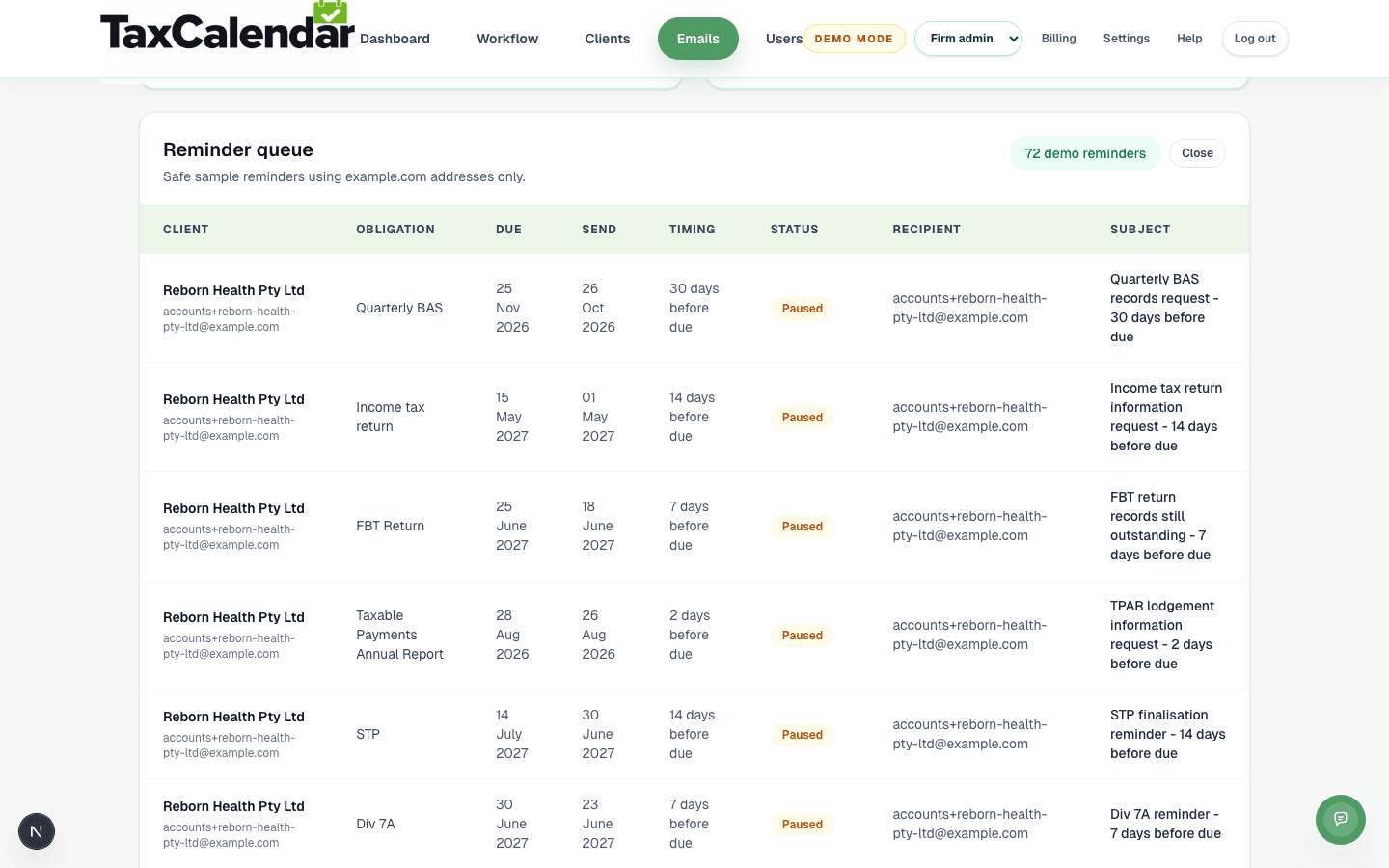
Staged reminder queue
A staged reminder schedule in TaxCalendar's reminder queue — 30, 14, 7 and 2 days before the due date — set against a client's obligations.
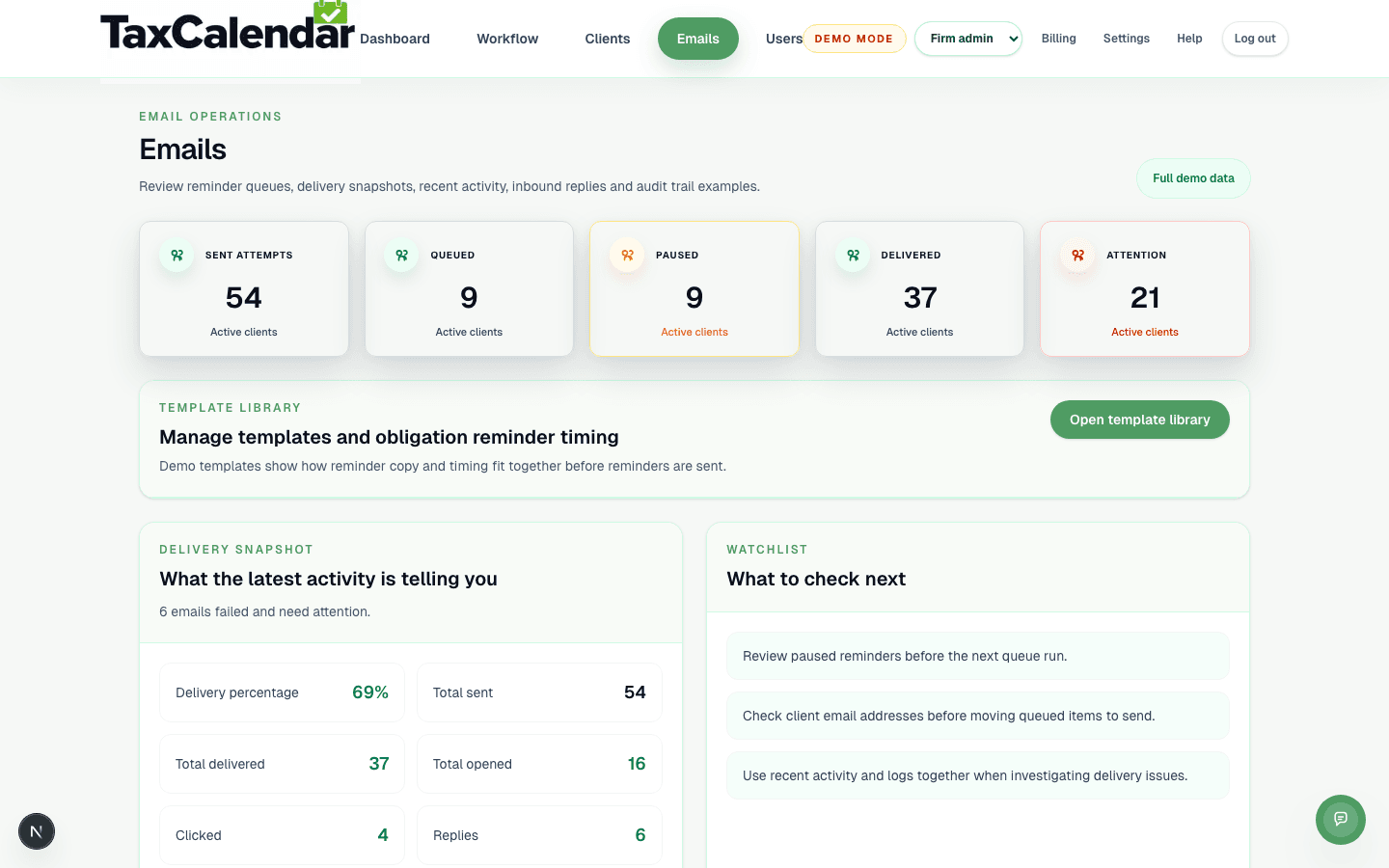
Email reminders dashboard
TaxCalendar's email operations dashboard, showing reminder delivery, opens, clicks and replies updating as clients respond.
What clients actually experience
From the client's side, a good reminder sequence feels like a gentle, consistent nudge rather than a last-minute scramble. They get an early heads-up that something is coming due, a mid-point reminder if nothing has been received, and a final reminder close to the deadline — each one clear about what's needed and by when.
This consistency matters for the client relationship as much as for compliance. Clients who are reminded early and clearly are far less likely to feel blindsided by a deadline, and far more likely to provide what's needed without a phone call from their accountant.
Why reminder status matters as much as the reminder itself
Sending a reminder isn't the same as knowing it worked. Firms need to see whether a reminder was delivered, whether the client has responded, and whether the obligation is still waiting on them — otherwise the reminder itself becomes another thing to track manually.
Connecting reminder delivery and client status to the obligation record means managers can see, at a glance, which clients are on track and which need a personal follow-up — rather than treating every client the same way regardless of how they've responded.
Recommended reminder and workflow cadence
A strong compliance process separates client communication from internal work allocation. Tax agents can use client reminders at 30, 14, 7, 2 and 0 days before the due date, while managers use earlier workflow dates to check whether records have arrived, preparation has started and review is on track.
This matters because lodgement deadlines are rarely missed for one dramatic reason. They are missed because small items stay hidden: a missing email address, an unassigned manager, a client who has not approved the work, or an obligation sitting in a spreadsheet that only one person trusts. TaxCalendar is built to make those issues visible before they become deadline pressure.
Where TaxCalendar fits
TaxCalendar helps Australian accounting firms turn compliance dates into a visible workflow. Firms can track clients, obligations, due dates, manager ownership, reminder status and lodged status in one place. That gives public practice teams a practical operating layer for BAS, IAS, ATO lodgement calendars, annual returns, client reminders and recurring practice management routines.
Related questions
How many reminders should a client get before a due date?
Many firms use a staged sequence — for example around 30, 14, 7 and 2 days before the due date — with the exact cadence depending on the obligation type and how the client typically responds.
Will clients find frequent reminders annoying?
Well-timed, clearly worded staged reminders are generally seen as helpful rather than intrusive — the goal is early, low-pressure notice rather than a last-minute chase.
Can TaxCalendar automate client reminders?
Yes. TaxCalendar sends staged reminders automatically against each client's obligations and due dates, and tracks delivery and response status so the firm can see who still needs to be chased.